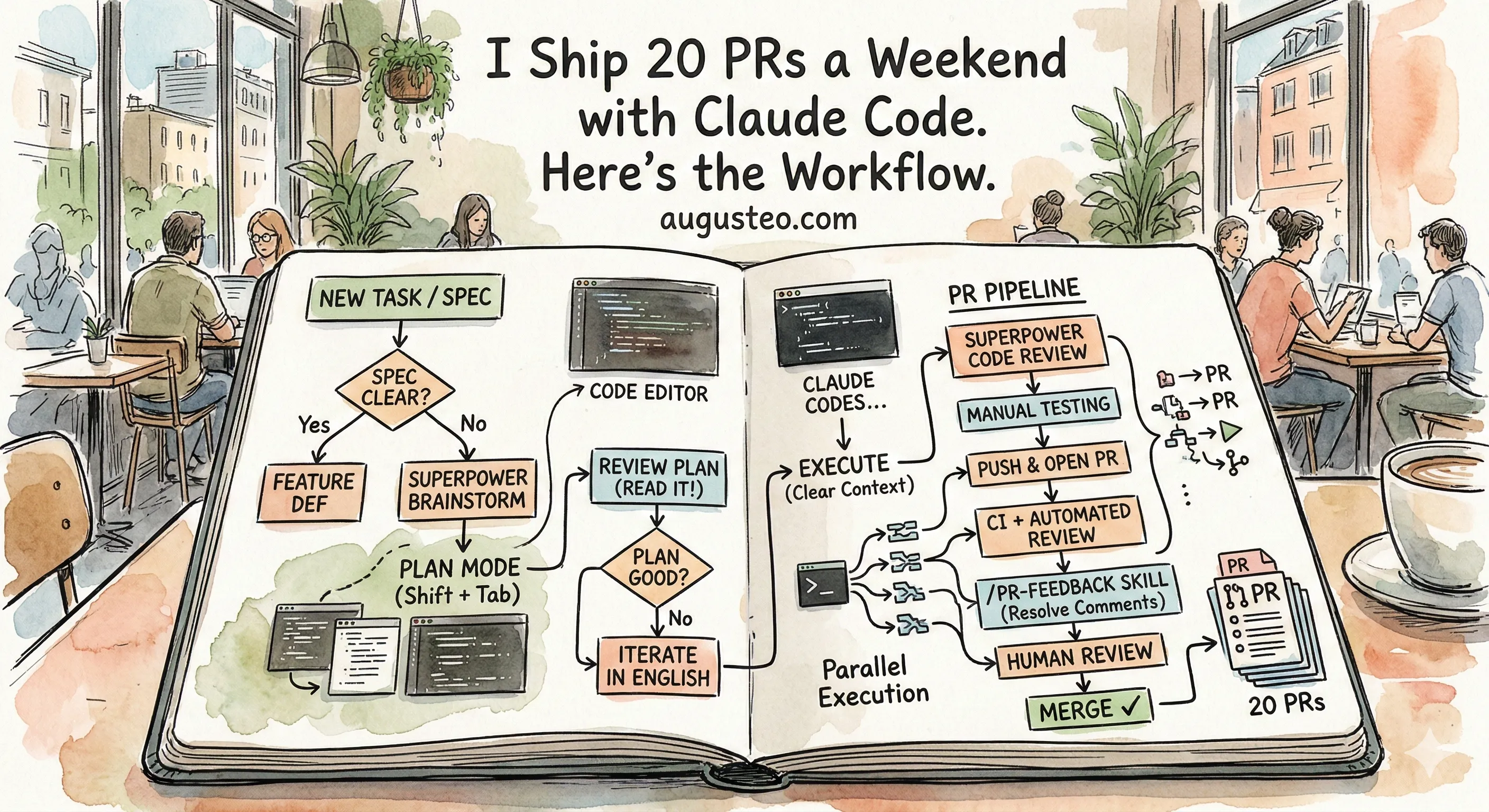
I watched Claude Code try to delete three pages from our app because I told it to “change the routing.”
That’s not what I wanted. I wanted to redirect one button to a different page. But Claude read “change the routing” and decided the old pages weren’t needed anymore. If I hadn’t read the plan before hitting execute, it would’ve nuked components we still needed elsewhere.
This is the most important thing I can tell you about working with AI coding tools: the planning phase is everything.
The Decision Tree
When a new task lands on your desk, the first question is simple: do you know exactly what to build?
Sometimes the spec is crystal clear. A Linear ticket with screenshots, reproduction steps, the works. In that case, skip the brainstorming and go straight to Feature Dev. Tell Claude Code what you need, and it’ll generate a plan.
But most of the time? The spec is vague. A customer said something hand-wavy. Your PM wrote two sentences in a Slack thread. You kind of know what they want, but the details are fuzzy.
That’s when you brainstorm first.
Brainstorm Mode Goes Deep
When I use Superpower Brainstorm, Claude doesn’t just ask “what do you want to build?” It goes deep. Should this icon be here? What happens when a user clicks this button? Should we use this component or that one? Do you want a modal or a new page?
It’s like a product discovery session, except it’s just you and Claude, and it happens in five minutes instead of an hour-long meeting.
People complain about “AI slop” in code. I get it. But slop is just under-specified spec. If you tell Claude “build a login page” with no other context, yeah, you’ll get generic slop. It doesn’t know your component library. It doesn’t know your auth patterns. It doesn’t know you already have a FormInput component that handles validation.
But if you brainstorm first, if you tell it “reuse our existing FormInput, follow the pattern in the signup page, use our auth service not a new one,” the output is clean. It matches your codebase. Because you told it exactly what “good” looks like in your project.
The engineers on my team who get the best output are the ones who spend the most time on the spec. The ones who get slop are the ones who skip the brainstorm and type a one-liner.
If your task involves any kind of UI, add Frontend Design to the brainstorm. It’s surprisingly good at thinking through layouts and interactions before any code gets written.
Plan Mode: Shift+Tab Before Anything
Here’s a tip that changed everything for me: always start in plan mode.
Press Shift+Tab until you’re in plan mode. Do all your brainstorming, feature definition, and design exploration here. Claude will think through the problem and show you a plan.
Your job now is to read that plan.
I can’t stress this enough. Read the plan. This is the actual job now.
Going back to my routing example: the plan said “remove pages X, Y, and Z since routing will change.” I caught it because I read the plan. I told Claude “don’t delete those pages, just change where the button points to.” It updated the plan in seconds.
Another common one: Claude will want to create a brand new component when you already have one that does basically the same thing. I’ll see that in the plan and say “reuse the existing DataTable component, don’t create a new one. Follow the same pattern we use in the estimates view.” Then it goes back into the codebase, finds the pattern, and adjusts the plan.
Same thing with tests. If the plan says “add unit tests” but it’s only covering the happy path, tell it: “make sure the unit testing is comprehensive.” It’ll go deeper on edge cases, error handling, boundary conditions. The plan shapes how much effort Claude puts into each part of the execution. If you don’t push back on thin test coverage during planning, you’ll get thin test coverage in the code.
This back-and-forth takes maybe two or three rounds. Sometimes five for complex features. It’s the most valuable time you’ll spend.
Research During Planning
Here’s something most people miss: Claude’s training data is already outdated by the time you’re using it.
Real example from my team: during a planning session, Claude proposed using tailscale serve for exposing a local service. I knew that was the old way. So I told it: “research the best practice for Tailscale in 2026.” It did a web search, found that tailscale services is the newer approach (lets you run multiple services on the same node), and updated the plan.
Don’t trust Claude’s memory for anything that changes fast. Tell it to use Context7 for documentation lookups, or just say “research the current best practice for X.” It combines web search with doc lookups and comes back with something current.
This is especially important for frameworks and libraries. React patterns from 2023 are not React patterns from 2026. Always verify.
Feed It Everything You’ve Got
The more context you give Claude during planning, the better your plan comes out.
We use the Linear MCP, so I just paste the ticket URL into Claude Code. It fetches everything (description, comments, acceptance criteria) automatically. I don’t even need to describe the task most of the time.
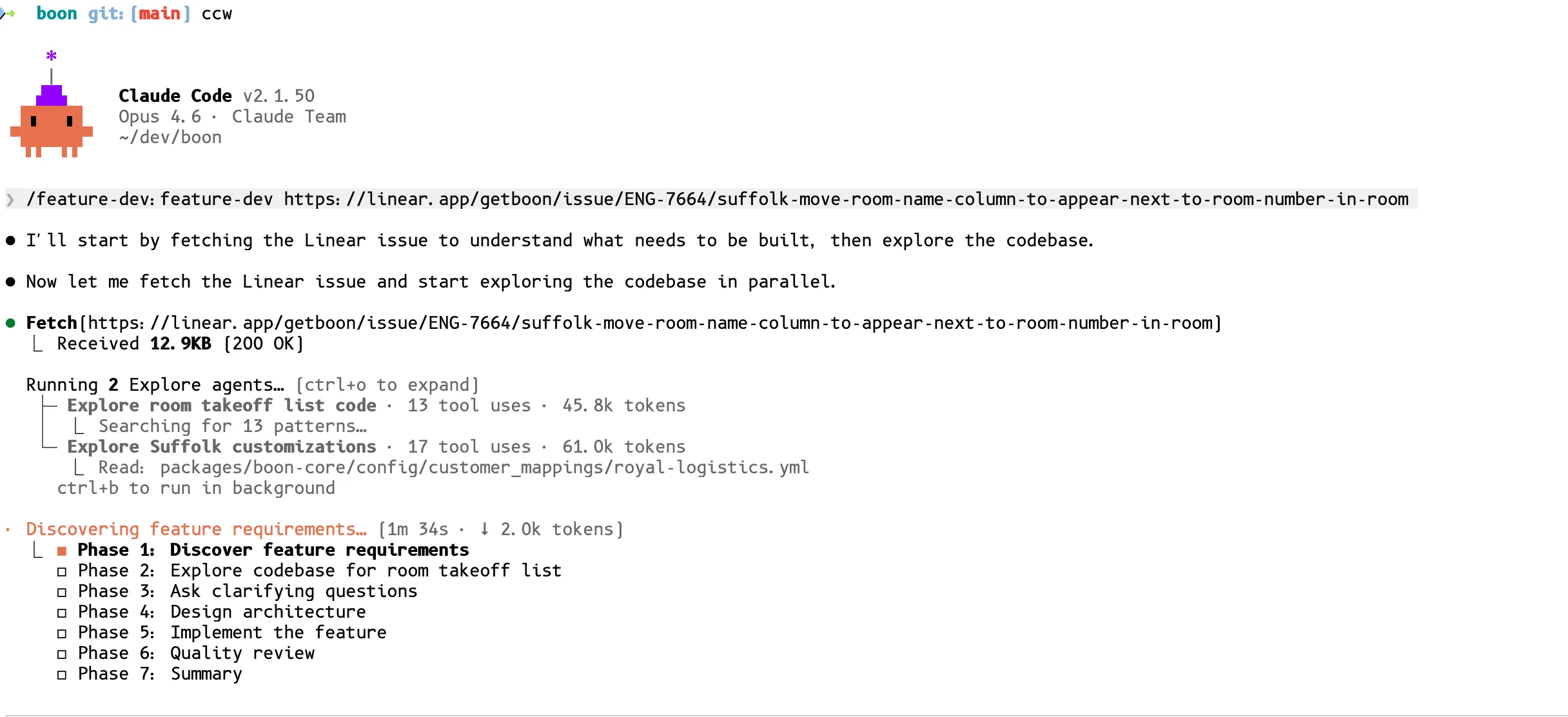
Here’s what that looks like in practice. I run /feature-dev with a Linear URL, and Claude fetches the ticket, spins up parallel exploration agents to understand the codebase, and builds a multi-phase plan:
If someone reports a bug with a video, I’ll watch the video myself, take screenshots of the key moments (what’s wrong, what it should look like), and drag them straight into the terminal. Claude handles images surprisingly well for UI problems. We even built an analyze-video skill that automatically extracts screenshots from videos for Claude. Happy to share if anyone wants it.1
I also pull context from other repos. “Hey, look at the backend repo at ~/projects/boon-api and find how we handle PDF processing there.” Claude reads the relevant files and incorporates that context into the plan. I keep my repos in sibling folders so they can reference each other easily.
If your product docs live in Notion or Google Docs, use those MCPs too. Pass in the PRD link and Claude pulls the context it needs.
Execute: Clear Context and Let It Run
Once my plan looks good, I execute it. And here’s the counterintuitive part: I clear the context 90% of the time.
The plan itself contains everything Claude needs to execute. All that back-and-forth conversation about “should we use this or that?” is noise at execution time. Clear it. Start fresh with just the plan.
The 10% where I keep context: when there was a really specific conversation about an edge case or architectural decision that isn’t captured in the plan. But that’s rare.
On --dangerously-skip-permissions
Yeah, I use it. I’ve been using it since day one.
I know this scares people. You read horror stories online about AI agents deleting databases or nuking folders. But here’s the thing: if you did the planning phase right, Claude already showed you exactly what it’s going to do. You reviewed the plan. You know what files it’ll touch.
The worst thing that ever happened to me: it merged directly to main instead of opening a PR. I reverted it in 30 seconds. That’s it.
If you’re uncomfortable with it, don’t use it. But understand that every permission prompt interrupts your flow. That adds up fast, especially when you’re running multiple instances (more on that in Part 2).
The PR Pipeline
OK so Claude finishes a task. It’s run the linter, run the tests, everything passes. Now what?
Step 1: Superpower Code Review. Before pushing anything, I tell Claude to run the Superpower Code Review skill on its own work. Think of it as the “are you sure about this?” pass. It catches obvious mistakes, inconsistencies, things that don’t match the codebase patterns.
Step 2: Push and open the PR.
Step 3: Automated PR review. At Boon, we have the Claude Code PR Review toolkit running alongside Cubic Reviewer on every PR. These catch stuff that the Superpower review missed. Different perspective, different checks.
Step 4: Resolve PR comments. This is where the pr-feedback plugin earns its keep.1 I go back to the same Claude Code instance (still has all the context from planning and execution) and say:
“Please look at the comments on the PR and then resolve them if needed and make sure to push the changes.”
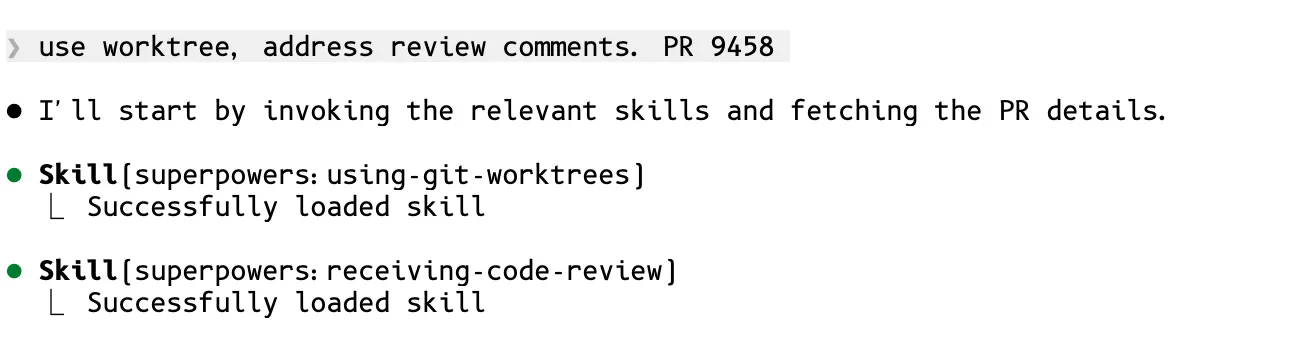
I do this on every single PR. Every one. Claude loads the worktree and PR feedback skills automatically, then fetches the PR comments:
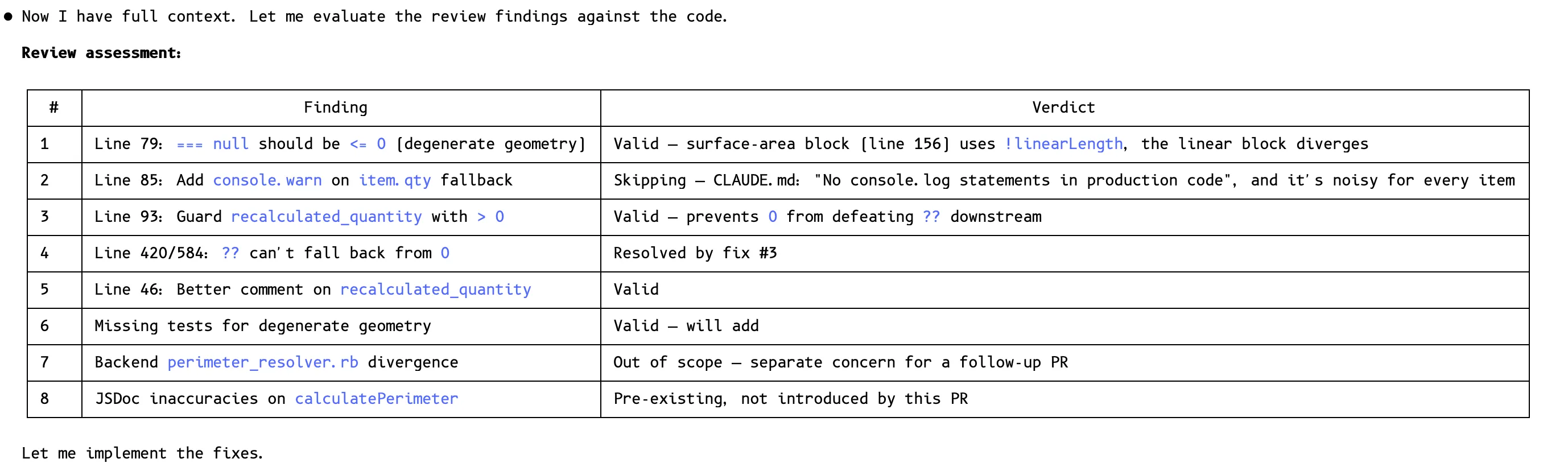
Then it does something really smart. It makes a structured assessment table of every review comment, triaging each one: valid (will fix), already resolved, out of scope (follow-up PR), or pre-existing (not introduced by this PR). Then it implements only the real fixes.
It resolves every comment thread so the CI gates pass.
This works really well because Claude still has the full context from the planning and execution stages. It knows why it made each decision, so it can have an intelligent conversation with the reviewer about whether a comment is valid.
Step 5: Human review. By the time a human reviewer sees this PR, it’s been through: your plan review, Superpower Code Review, automated PR toolkit review, Cubic review, and Claude’s comment resolution pass. The human is looking at a clean, well-tested PR. Their job is to catch architectural concerns and business logic issues, not formatting bugs or missing null checks.
Tips
Working on multiple tickets? Use git worktrees so each Claude Code session has its own branch and working directory:
# I use atuin for cross-device alias sync, but a plain alias works fine
alias ccw='claude --dangerously-skip-permissions --worktree'
Type ccw and you get a new session with its own worktree. Three keystrokes. I’ll cover the full parallel workflow in Part 2.
The Full Flow
Here’s the complete single-instance workflow:
                    ┌─────────────┐
                    │  New Task   │
                    └──────┬──────┘
                           │
                    ┌──────▼──────┐
                    │ Spec clear? │
                    └──┬───────┬──┘
                   Yes │       │ No
                       │       │
              ┌────────▼┐  ┌──▼──────────────────────┐
              │ Feature │  │ Superpower Brainstorm    │
              │   Def   │  │ (+ Frontend Design if UI)│
              └────┬────┘  └────────────┬─────────────┘
                   │                    │
                   └────────┬───────────┘
                            │
                   ┌────────▼─────────┐
                   │    Plan Mode     │
                   │  (Shift + Tab)   │
                   └────────┬─────────┘
                            │
                   ┌────────▼─────────┐
                   │   Review Plan    │◄──────────┐
                   │  (READ IT!)      │           │
                   └────────┬─────────┘           │
                            │                     │
                   ┌────────▼─────────┐    ┌──────┴──────┐
                   │   Plan good?     │ No │ Iterate in  │
                   └───┬──────────┬───┘───►│  English    │
                   Yes │          └────────└─────────────┘
                       │
              ┌────────▼──────────┐
              │ Execute           │
              │ (clear context)   │
              └────────┬──────────┘
                       │
                  Claude codes...
                       │
              ┌────────▼──────────┐
              │ Superpower        │
              │ Code Review       │──► auto-fixes findings
              └────────┬──────────┘
                       │
              ┌────────▼──────────┐
              │ Manual Testing    │
              │ (you test it)     │
              └────────┬──────────┘
                       │
              ┌────────▼──────────┐
              │ Push & Open PR    │
              └────────┬──────────┘
                       │
              ┌────────▼──────────┐
              │ CI +              |
              | Automated Review  │
              │ (Cubic + PR       │
              │  Review Toolkit)  │
              └────────┬──────────┘
                       │
              ┌────────▼──────────┐
              │  /pr-feedback     │
              │  (resolve or      │
              │   recommend)      │──► shows you what to address
              └────────┬──────────┘
                       │
              ┌────────▼──────────┐
              │  Human Decision   │
              │  on comments      │──► "all of them" keeps going
              └────────┬──────────┘
                       │
              ┌────────▼──────────┐
              │  Human Review     │
              └────────┬──────────┘
                       │
              ┌────────▼──────────┐
              │     Merge ✓       │
              └───────────────────┘
Everything above is one Claude Code instance. One task, start to finish. Plan, execute, review, push, merge.
But I don’t work one at a time. I run five of these in parallel. In one weekend, I shipped 20 PRs.
Part 2 is about how.
This is Part 1 of a 3-part series on my Claude Code workflow. Part 2: Parallel Execution drops tomorrow.
Footnotes
-
Company Plugin Store. Claude Code lets you add custom marketplaces alongside the official one. We set up an internal repo and anyone on the team can install it with one command:
/plugin marketplace add getboon/boon-plugins. Once added, it shows up right next to the official Anthropic marketplace: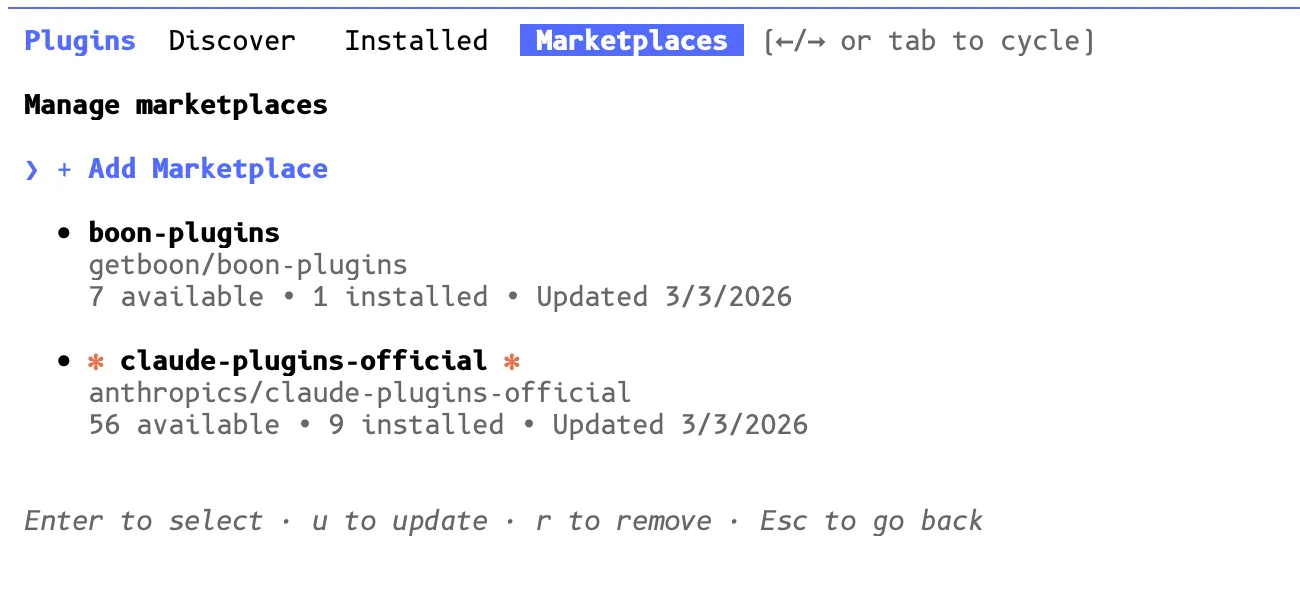 From there, engineers browse and install company-specific plugins. We’ve got plugins for Linear, Sentry, Slack, video analysis (
analyze-video), andpr-feedback.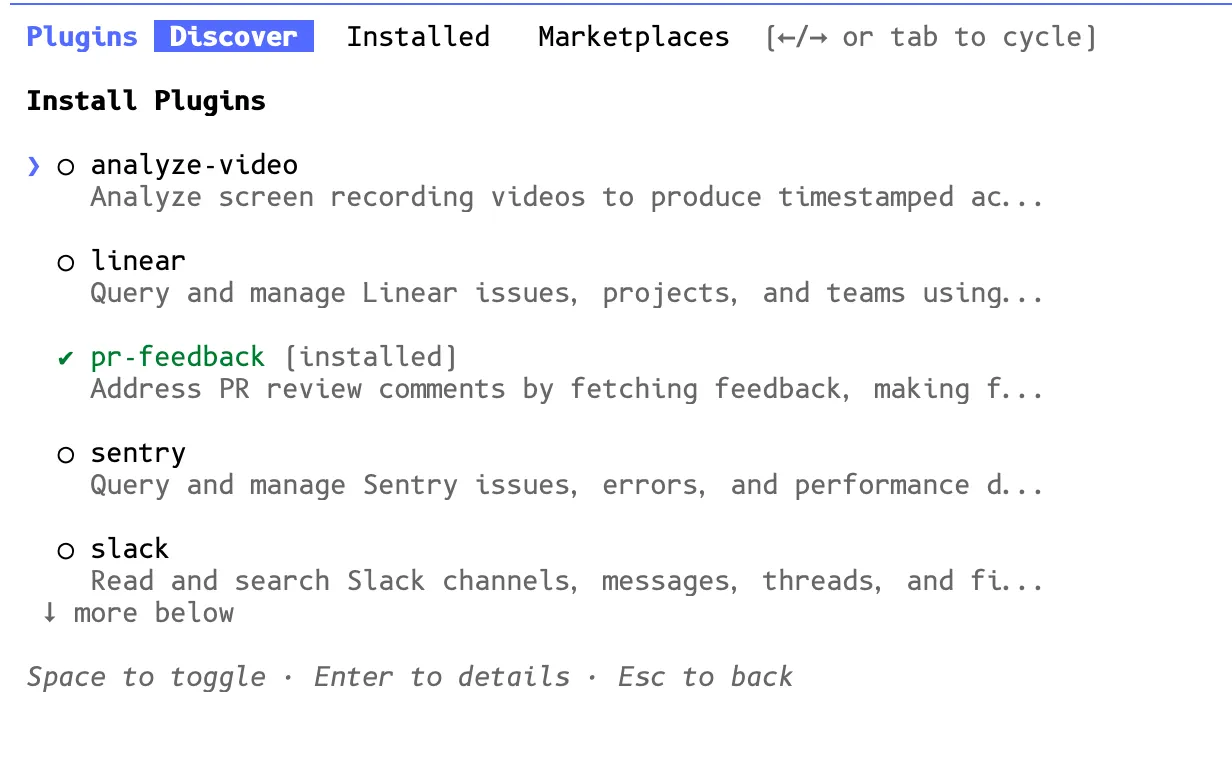 Enable auto-update so everyone gets the latest plugins automatically.
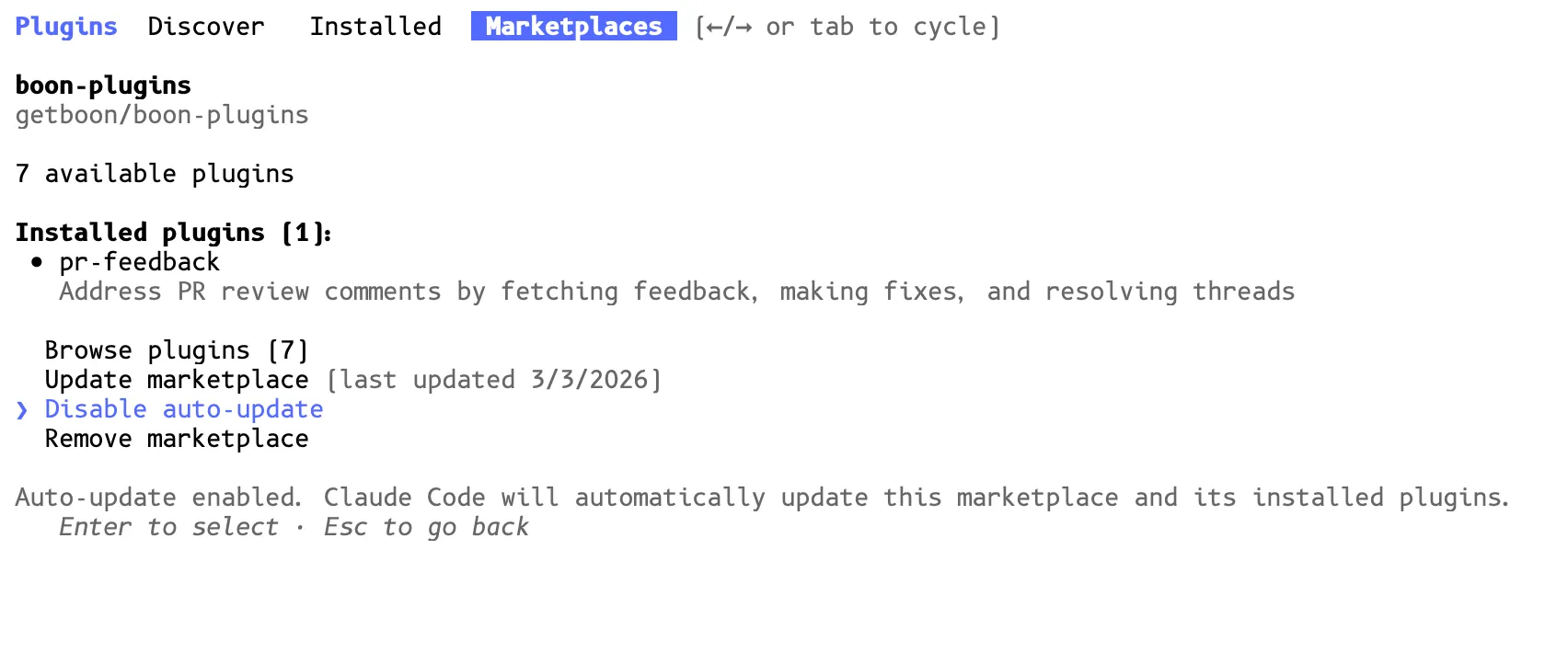 That’s the beauty of a shared marketplace: when we add a new plugin or update an existing one, everyone gets it. No Slack messages saying “hey update your config.” If you want to set up something similar for your team, the boon-plugins repo is a good reference. ↩ ↩2